
About This Release
This new release is mainly dedicated to automation of package quality control. Now the user can easily test the package safety, compatibility and readiness for deployment. We have designed a new application Quality Approver for this purpose. Quality Approver runs locally and interacts with a local and remote pre-configured virtual machines (VM) for executing Windows App Certification Kit. The Kit tests your MSI/MSIX/APPX package and its apps in an unattended mode.
We have introduced the support of command line options in MSI Generator. The use of command line options allows to automate the capturing (repackaging) process.
In order to eliminate the negative effect of system noise (log and cache files, registry entries, etc.) on the generated packages, we have reconsidered the pre-defined exclusion filters. The newly added filters allow detecting and filtering out a system garbage more efficiently. This saves the reviewing time and increases the package quality.
We have also implemented a number of feature requests from our customers and enhanced the performance of MSI Generator.
Automated Testing
Needless to say how important it is to check the package safety, compatibility and readiness for deployment. PACE Suite - Quality Approver is our answer to this challenge. Quality Approver is a tool that runs locally and interacts with either local or remote pre-configured virtual machines (VM) to execute the following tests.
- Test MSI (+MST) package and its apps for compliance with the Desktop App Certification Program in an unattended mode. For more information, see Windows Desktop app tests.
- Test an MSIX/APPX package (bundle) and its apps against the Microsoft Store requirements in an unattended mode. For more information on the tests, see Windows Store App tests and Windows Desktop Bridge app tests.
Quality Approver supports automated package testing on multiple virtual machines, hosted on the VMware ESXi, Microsoft Hyper-V and Oracle VirtualBox hypervisors. Quality Approver can run the tests locally as well, if the local host is configured as virtual machine which can be reverted to the previous state.
Quality Approver invokes the wizard which guides the user through the steps as shown below.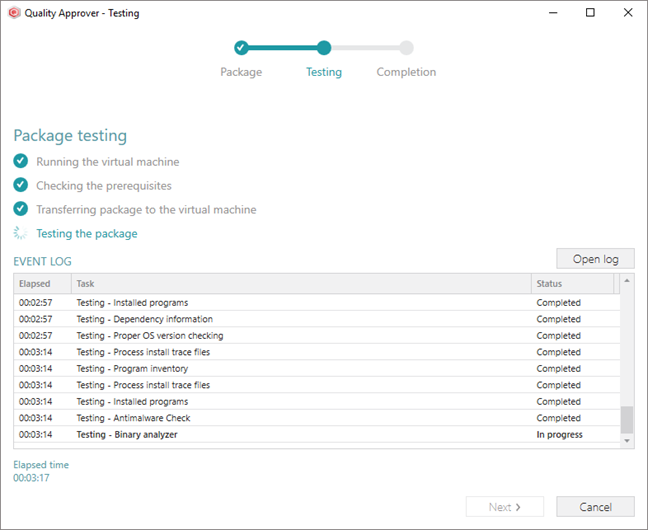
Once the test completes, the user receives an HTML report with the results, the potential impact of issues and the suggested fixes. Here is the sample test report: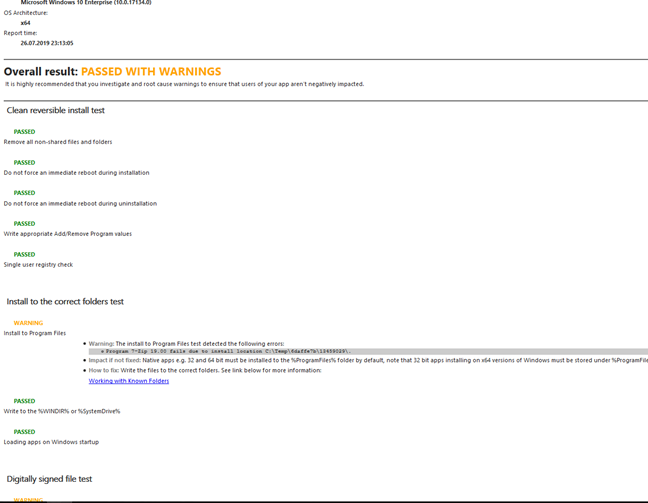
Automated Repackaging
Automation saves time and efforts. PACE Suite introduces the command line support for MSI Generator. The use of command line options allows automation of the capturing (repackaging) process. The user can easily write a short script for running the pre-install and post-install scans with MSI Generator, apply the filters to the captured resources and generate the package as it is shown below.
:: Running pre-install scanning  (taking first snapshot)
 "C:\Program Files (x86)\PACE Suite\MSI Generator\MsiGenerator.exe" -snapshot "path\to\snapshot\ first.msgn"

:: Running source installation
 "C:\Source_installation\installer.exe" /silent

:: Running post-install scanning (taking second snapshot)
 "C:\Program Files (x86)\PACE Suite\MSI Generator\MsiGenerator.exe" -snapshot "path\to\snapshot\ second.msgn"

:: Creating project (comparing first and second snapshots)
 "C:\Program Files (x86)\PACE Suite\MSI Generator\MsiGenerator.exe" -compare "path\to\snapshot\ first.msgn" "path\to\snapshot\second.msgn" "path\to\output\project\folder" "projectName"

:: Building MSI package from project
 "C:\Program Files (x86)\PACE Suite\MSI Generator\MsiGenerator.exe" -buildPackage "path\to\ output\project\folder\projectName\projectName.mgp" "path\to\package.msi" "msiSettingsProfile"
Merge Modules Integration
The use of Merge Modules (MSM) ensures a proper delivery of the shared code, files, resources, registry entries, and the setup logic to the installed applications. MSI Generator takes care of detection and integration of the appropriate Merge Modules into your repackaged installation.
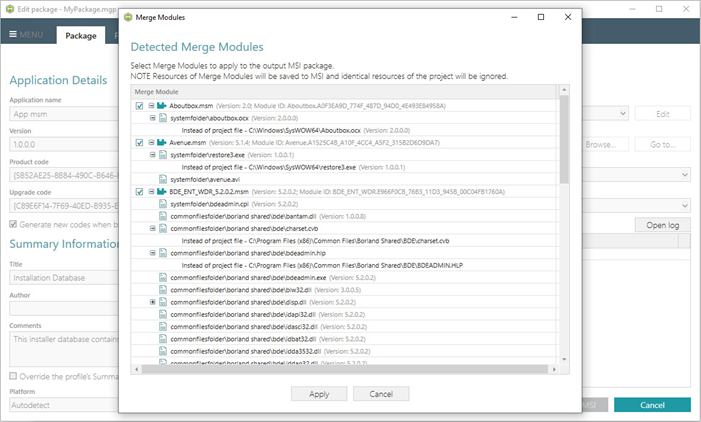
For the convenience, we have included the most common and recent Merge Modules into MSI Generator. You can find them at C:\Program Files (x86)\PACE Suite\MSI Generator\Modules.
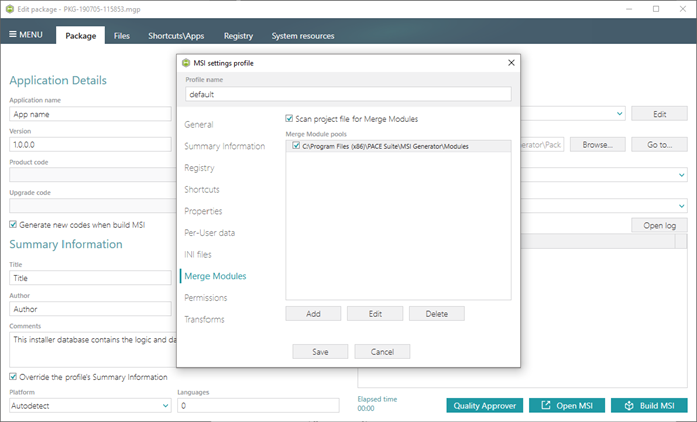
With the first installation of PACE Suite, this pool of Merge Modules will be automatically added to the default MSI settings profile. With update to PACE Suite 5.3, the user will have to edit the MSI settings profiles in order to add this pool manually.
Enhanced Exclusion Filters
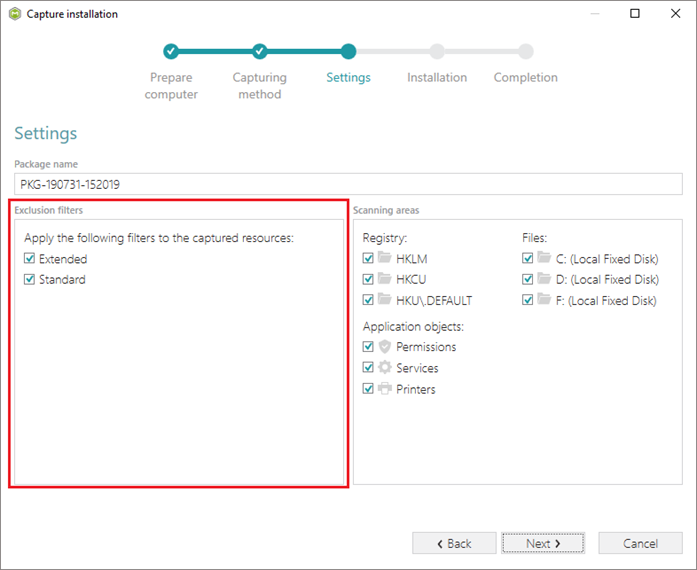
Windows operating system and WIndows services produce a lot of system noise (log and cache files, registry entries, etc.) that could have a negative impact on the quality of generated package. In many cases, an MSI package with a captured system noise cannot be installed as tries to write to the system-protected locations.
We enhanced our pre-defined exclusion filters in MSI Generator aiming to filter out this system noise more efficiently. This saves the reviewing time and increases the package quality. The new filters will be applied to the captured resources by default.
Association Detection On Exclude
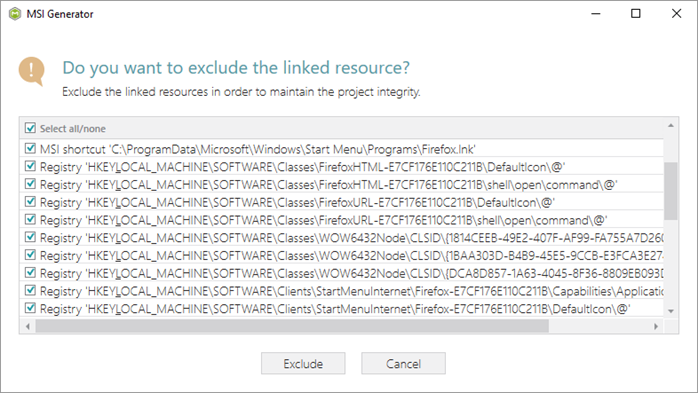
The user may like to exclude a captured library file (DLL, OCX, etc.) with all its registry entries. The newly introduced intelligent mechanism in MSI Generator detects and displays registration (COM) information, which is directly or indirectly associated with the excluded file. The user can either exclude the linked items or leave them included.
Improved Import Settings
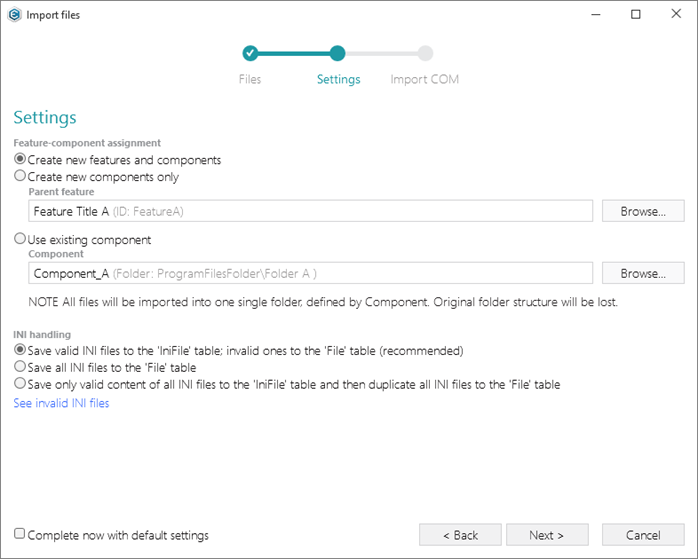
PACE Suite 5.3 presents improvements to management of settings for importing files and registry into MSI packages. In the new version of MSI Editor, you can import resources to a package with the following feature-component assignments:
- Create new features and components according to the packaging best practices.
- Create new components only and link them with the selected feature.
- (NEW) Use the existing component.
Note that the use of the last option could imply certain restrictions on the imported resources. For instance, all imported files will be placed into a single folder defined by the selected component. The original folder structure will be lost in this case. Mixing per-user and per-machine registry entries in a single component may influence the Windows Installer self-healing mechanism.
Other Improvements
MSI Generator
- Added support of Japanese and other non-english typographic symbols.
- Decreased the UI response time for the Files, Shortcuts\Apps -> MSI, and Registry tabs.
- Added the calculated number of excluded resources on the Files, Shortcuts\Apps -> MSI, and Registry tabs.
- Added the filter for displaying the only excluded resources.
Comments
0 comments
Please sign in to leave a comment.